Traditional referral programs suffer from extreme friction. Customers are asked to remember complex alphanumeric promo codes, log into clunky customer web portals, or download dedicated brand apps just to invite a colleague or friend.
By embedding dynamic, personalized referral mechanics directly into Apple Wallet and Google Wallet passes, businesses eliminate all app friction—removing app-download friction for both in-person and digital sharing channels. Results vary by program design; treat the workflow below as an implementation playbook, not a guaranteed outcome.
1. The Dual-Channel Referral Architecture
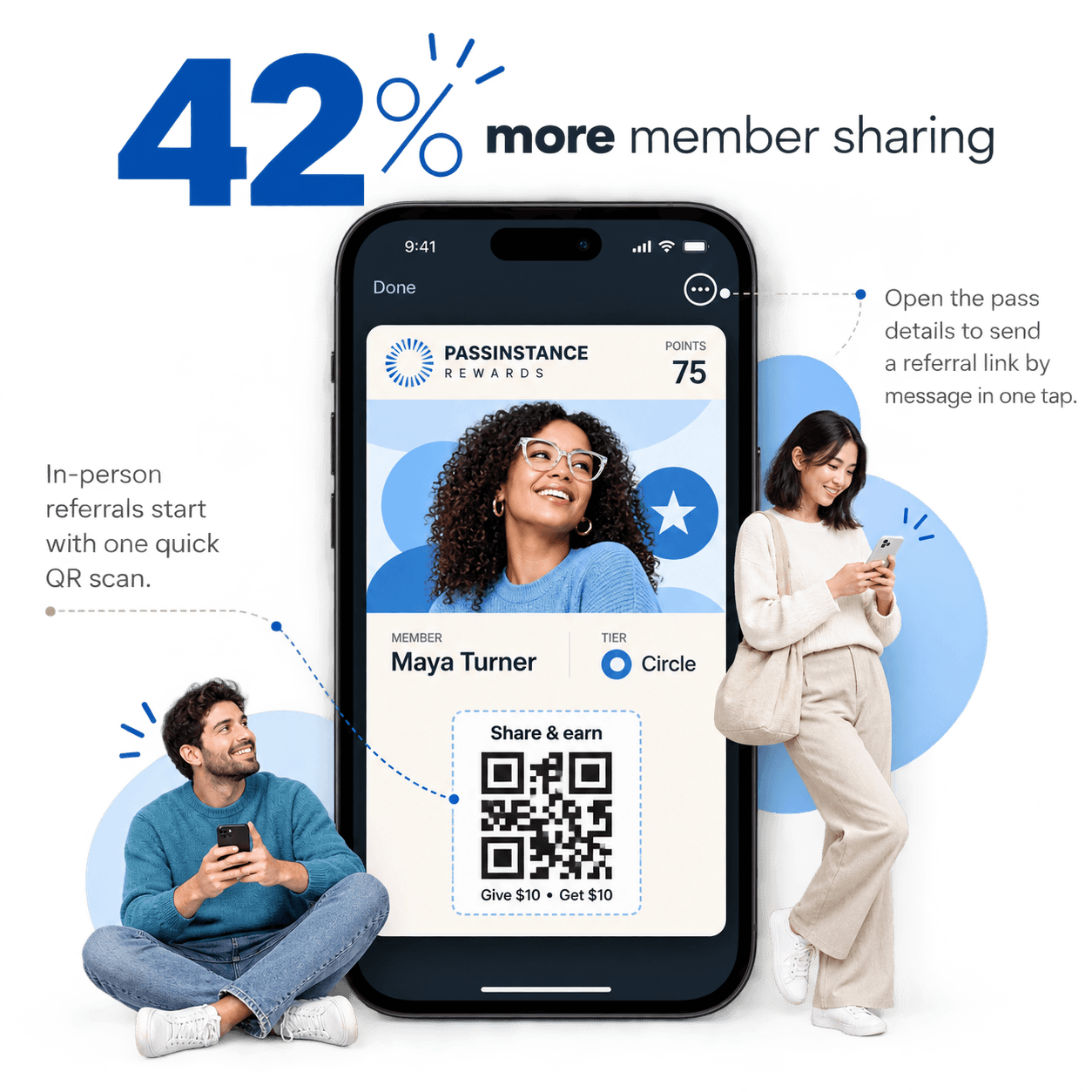
Mobile wallet passes provide two native ways for members to share invites:
-
1In-Person Peer-to-Peer Scanning: The member displays their pass with a referral code or hosted share link QR. A friend scans the code with their standard camera app to claim a welcome credit and save their own pass.
-
2One-Tap Invite Links on Pass Back: From the pass back details (
...menu in Apple Wallet / details view in Google Wallet), the holder taps a pre-configured referral URL that opens your branded referral web page or native share sheet / email compose view.
2. In-Person vs. Digital Wallet Referral Loops
| Attribute | Traditional Referral Link | Wallet Pass In-Person QR | Wallet 1-Tap Messaging |
|---|---|---|---|
| Friction Level | High (login, copy-paste code) | Zero (camera scan) | Extremely Low (native share sheet) |
| Share Velocity | Slow (email / portal visits) | Immediate (in-store / dinner) | Fast (instant chat message) |
| Attribution | Often lost at POS checkout | Tokenized to member ID when configured | Tokenized UTM / webhook when configured |
| Reward Delivery | Delayed manual batch email | Wallet pass update message | Wallet pass update message |
| Sharing Friction | Baseline (high) | Lowest (camera scan) | Very low (native share) |
3. Dynamic "Give $10, Get $10" Point Multipliers
When your backend or POS detects that a referred customer has completed their first purchase, an API call or webhook updates both passes:
-
1Referee Activation: The new customer's pass receives their welcome bonus (e.g. $10 credit or 50 bonus points) via the API update endpoint.
-
2Referrer Notification: The original member's pass receives a wallet pass update with a configured change message:
> "Good news! Maya Turner just used your invite. We added $10 to your wallet rewards balance."
-
3Pass Artwork Refresh: The points counter and VIP progress bar update automatically in Apple Wallet and Google Wallet.
4. Best Practices for Wallet Referral Programs
-
Keep the Reward Visible on the Pass Front: Use clear, outcome-oriented copy such as
"Give $10 • Get $10"or"Invite a Friend • Earn 50 Pts". -
Set Up Automated Milestone Alerts: Trigger push notifications when a member reaches 3, 5, or 10 successful referrals.
-
Enforce Anti-Abuse Tokenization: Passinstance generates single-use or cryptographically signed referral tokens to prevent fraudulent self-referrals.
Learn more about automating your pass logic in our Pass Mechanics Guide or explore our Retail Loyalty Solutions.