
01
Members cannot see or feel status progress on static cards
When a digital loyalty card looks identical at 0 points and 500 points, loyal buyers miss tier milestones unless staff check a CRM screen manually.
Define how members move from Bronze to Silver, Gold, and open-ended Platinum tiers on one template — automatically swapping pass colors, artwork, and Tier reached lock-screen notifications.
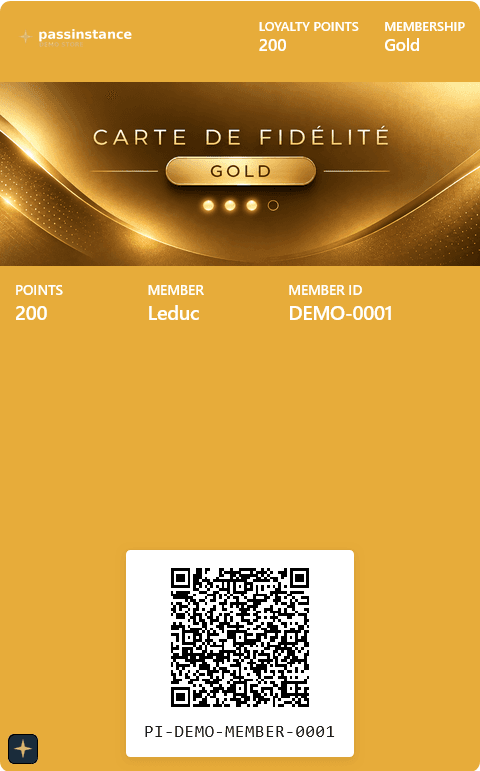
Burnished Gold Emblem
260 pts until Platinum (500+ pts)
Congratulations! Your tier has been updated to Gold.
WHY LOYALTY PROGRESSION RULES ARE NEEDED
A points balance alone rarely communicates status. Loyalty progression rules bind point thresholds directly to visual wallet pass themes, required asset checks, and real-time upgrade notifications.
When a digital loyalty card looks identical at 0 points and 500 points, loyal buyers miss tier milestones unless staff check a CRM screen manually.
Without rule-driven tiers on one template, teams duplicate pass templates for Silver, Gold, and Platinum — causing broken barcodes, manual re-issuance, and inconsistent design updates.
Unvalidated threshold gaps, illegible color combinations, or missing Apple/Google tier artwork cause awkward wallet states when a customer crosses a point milestone.
HOW TIER EVALUATION WORKS
Every tier inherits your core template layout while overriding points bounds, pass palette, Wallet artwork, and milestone messaging.
Warm Espresso & Bronze Foil
“Welcome to Bronze! Collect 100 pts to unlock Silver status.”
Brushed Chrome Metallic
“Congratulations! Your tier has been updated to Silver.”
Burnished Gold Emblem
“Congratulations! Your tier has been updated to Gold.”
Dark Titanium Finish
“Congratulations! Welcome to Platinum — our highest loyalty tier.”
HOW TO CONFIGURE & USE
Follow these six steps inside Template settings -> Points & Tiers to set ranges, test contrast and artwork, and automate wallet pass upgrades.
In Passinstance Studio, open Template settings -> Points & Tiers to load the Loyalty progression rules canvas and rule summary bar (Tiered progression -> Point accumulation -> Tier upgrade).
Set Progress range (Starts at and Ends at point boundaries) alongside Default progress (New member starts with e.g. 0 pts, and Default increment e.g. 100 pts used during scans).
Review the color-coded Progression map (0-99, 100-199, 200-499, 500+ pts). Hover any row or map block to preview its live Wallet pass design; click + Add tier to append the next level automatically.
Open a tier to edit its Tier name, Threshold (PTS), and Maximum Value (leave blank for an open-ended top tier). Write a custom Tier reached message up to 500 characters using {variable} placeholders.
Pick Label text color, Value text color, and Background color with live WCAG AA/AAA contrast ratings, then upload required Logo and Google Wallet logo (660 x 660 px) assets so no tier stays flagged NEEDS REVIEW.
Clear any Progression gaps detected banner, publish your draft template, and update balances via Scanner, Automations, or REST API — Passinstance handles live wallet upgrades automatically.
Loyalty progression overview — Bronze tier (0–99 pts) & Progress settings
Inspect the GOAL/TRIGGER/AFFECTED/RESULT strip, full Progression map (0-99 to 500+ pts), tier rows with mini theme thumbnails, and baseline Progress settings in one view.
STUDIO CONTROLS & GUARDRAILS
Studio validates configuration before publishing, while the API keeps issued Apple Wallet and Google Wallet passes synchronized across every point update.
Displays every loyalty band proportionally across your program and switches the right-hand Live preview pane when you hover over Bronze, Silver, Gold, or Platinum.
Studio blocks overlapping ranges or negative bounds and surfaces a Progression gaps detected banner if points could fall between tiers. Leave Maximum Value blank on the final tier for an open-ended cap (e.g. 500+ pts).
Starts at and Ends at define overall program bounds (scanned point additions cap cleanly at Ends at), while New member starts with and Default increment control initial balance and default scan delta.
Shows real-time contrast badges (such as 7.74:1 AAA and 15.31:1 AAA) against the tier background so pass fields remain readable and serialize reliably to Apple Wallet rgb(r, g, b) values.
Tracks required assets (Logo, Google Wallet logo 660 x 660 px) and optional tier background or Android overrides. Required-slot banners highlight missing artwork via Upload missing.
Supports {variable} autocomplete (up to 500 characters) for custom milestone alerts. Leave blank to use the built-in upgrade message when Passinstance pushes Apple APNs or Google Wallet updates.
SCANPassinstance Scanner adds points (or uses Default increment), clamps within Ends at, and immediately evaluates the next qualifying tier.
WEBHOOKVerified order-paid webhooks, Shopify/Shopware sync, or Workflow-Engine rules award points and emit tier.upgraded events.
MANUALSupport staff adjusting a holder's balance in the dashboard immediately recalculate and sync tier colors and imagery.
SCHEDULEDBulk CSV imports or scheduled loyalty recalculations update qualifying passes in bounded batches with idempotent theme resolution.
FAQ
When a pass balance updates, the backend sorts tiers ascending by Threshold (minValue) using exact Decimal math and selects the highest qualifying tier whose minValue <= storedValue <= maxValue (or unbounded when Maximum Value is blank).
Studio blocks saving overlapping ranges directly in the tier editor and alerts you with a 'Progression gaps detected' banner on the tier list if integers are skipped between consecutive ranges.
Required brand slots (such as Logo and Google Wallet logo when Google Wallet is enabled) are tracked per tier with a NEEDS REVIEW check, while optional tier background or Android overrides fall back cleanly to your base template artwork when left unset.
If you fill in Tier reached message (with optional {variable} placeholders), that copy is sent on transition. Otherwise Passinstance sends 'Congratulations! Your tier has been updated to {tier}.' on upward promotions or 'Your tier has been updated to {tier}.' if points drop into a lower band.
Configure your Progression Map, verify WCAG contrast and Wallet images in Studio, and automate live Apple Wallet and Google Wallet upgrades.