
Overview
Personalizing wallet passes for thousands or millions of cardholders relies on Custom Properties (schema definitions declared on your template) paired with {variable} bindings inside the Field model across header, primary, secondary, auxiliary, back, and footer zones. At pass generation and update time, Passinstance hydrates these tokens from the pass record's structured JSON attributes dictionary and formats dates, numbers, currencies, and lock-screen push notifications natively for Apple Wallet and Google Wallet.
System Architecture: Dynamic Field Hydration & Indexing
1. Custom Attributes & Property Types (types/attributes.ts)
Before binding dynamic tokens into pass fields, define your program's data schema under Integrations & automation -> Custom attributes in the Visual Editor.
Passinstance supports 11 distinct attribute data types (PropertyType in types/attributes.ts):
Property Type (PropertyType) | Description & Input Rendering | Supported Validations & Formats |
|---|---|---|
text | Single-line string (e.g. member name, tier code). | Regex pattern, min/max length, uniqueness. |
email | Customer email address. | RFC 5322 syntax validation, uniqueness. |
phone | International telephone number. | E.164 phone formatting (+14155552671), SMS OTP verification. |
number | Numeric integer or decimal value (e.g. points balance, stamps). | Min/max bounds, step increments, decimal formatting. |
date | Calendar date (e.g. date of birth, membership expiry). | ISO 8601 (YYYY-MM-DD), date style formatting. |
checkbox | Boolean flag (e.g. marketing consent, VIP status). | Evaluates as true or false. |
select | Single-choice selection from configured options. | Predefined option list with value/label pairs. |
dropdown | Searchable dropdown selector for large option lists. | Predefined option list with autocomplete. |
radio | Radio button group for explicit option selection. | Predefined option list. |
textarea | Multiline text for notes or terms. | Useful for back fields and customer messages. |
range | Slider range control for numerical boundaries. | Min/max bounds, default step value. |
Property Schema Flags & Modifiers
Each custom attribute supports the following schema configuration flags:
-
name: The unique property key (e.g.,loyaltyTier,pointsBalance). Used in variable tokens as{loyaltyTier}. -
required: If enabled, passes cannot be issued without this attribute populated. -
hidden: Internal property for API operations and automation; hidden from public PassFlow registration forms. -
readonly: Passholders cannot edit this value after initial issuance. -
isUnique: Enforces composite uniqueness across the workspace, preventing multiple active passes with the same attribute value (e.g., customer account number). -
otp: Enables One-Time Passcode verification (SMS forphoneor email code foremail) during PassFlow self-enrollment. -
validations.pattern: Optional custom regular expression (e.g.^[A-Z]{2}-[0-9]{5}$) enforced at API and form boundaries.
2. Dynamic Variable Syntax & Autocomplete
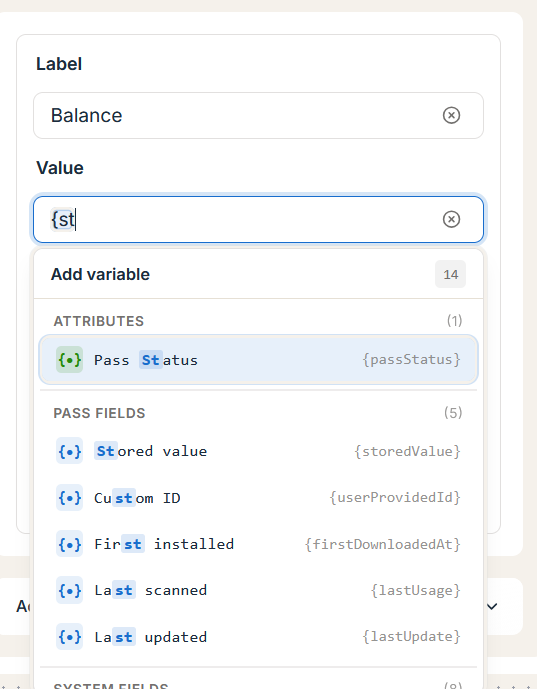
Inside any field label, value, barcode text, or notification message, type the open curly brace { to trigger the autocomplete suggestion menu:
You can combine static text with multiple tokens in a single field:
-
Example:
"Hello {firstName}, your {memberTier} status is active." -
Example:
"ID: {externalId} | Points: {pointsBalance}"
3. Conditional Field Visibility (showWhen)
Passinstance includes a powerful conditional visibility engine that dynamically shows or hides fields on the pass based on attribute values, system status, or time.
The condition evaluator (evaluatePreviewVisibilityCondition.ts in the dashboard and evaluateVisibilityCondition in the backend API) evaluates boolean expressions before rendering Apple Wallet fields and Google Wallet text modules:
Supported Syntax & Operators
| Operation | Syntax Example | Evaluation Behavior | ||||
|---|---|---|---|---|---|---|
| Existence / Truthiness | {companionPassId} | Evaluates to true if {companionPassId} is present, non-null, and non-empty. | ||||
| Equality | {memberTier} == "Gold" | Evaluates to true when attribute exactly matches the string. | ||||
| Inequality | {status} != "Suspended" or {status} <> "Suspended" | Evaluates to true when attribute does not match. | ||||
| Numeric Greater Than | {pointsBalance} > 500 | Parses numeric attribute and evaluates if greater than 500. | ||||
| Numeric Greater or Equal | {pointsBalance} >= 1000 | Evaluates if greater than or equal to 1000. | ||||
| Numeric Less Than | {strikes} < 3 | Evaluates if less than 3. | ||||
| **List Inclusion (`\ | =`)** | `{tier} \ | = Silver,Gold,Platinum` | Evaluates to true if {tier} equals any of the comma-separated values. | ||
| Operating System | {operatingSystem} == iOS | Targets Apple Wallet (iOS / watchOS) or Google Wallet (Android). | ||||
Temporal (now()) | now() > 2026-12-31T23:59:59Z | Evaluates pass rendering relative to current UTC timestamp. | ||||
Boolean AND (&&) | {tier} == "VIP" && {pointsBalance} >= 500 | Both conditions must be satisfied. | ||||
| **Boolean OR (`\ | \ | `)** | `{isVip} == true \ | \ | {spendTotal} > 1000` | Either condition must be satisfied. |
Feature In-Depth: Show a Field Only When Another Field Is Set
A frequent requirement is displaying a dependent field (such as a gate number, companion seat, or discount code) only when that attribute is populated:
-
Configure the dependent field's Visibility Condition (
showWhen) as:
{otherFieldKey}
-
Blank / Null Handling: If
{otherFieldKey}is null, undefined, empty string"", or whitespace, the expression evaluates tofalse. Apple Wallet will completely omit the field from the layout, and neighboring fields will gracefully expand to fill the available space.
4. Complete Field Model Specification
Every field attached to a template via request payload supports the following properties:
| Property | Type | Allowed Values / Format | Platform Behavior & Rules | |
|---|---|---|---|---|
key | string | Unique identifier per pass (e.g. balance_fld) | Used by iOS and Android to diff field values across push updates. | |
label | string | Static caption or {variable} | Displayed in labelColor above or below the value. | |
value | `string \ | number` | Static text, number, ISO date, or {variable} | Hydrated at issuance/update time from Pass.attributes, externalId, or system tokens. |
changeMessage | string | String containing %@ (e.g. "Tier upgraded to %@") | Triggers a native iOS lock-screen push alert when value changes; %@ is replaced by the new formatted value. | |
showWhen | string | Condition expression (e.g. {tier} == "VIP") | Evaluates visibility dynamically based on passholder attributes. | |
textAlignment | PKTextAlignment | PKTextAlignmentLeft, PKTextAlignmentCenter, PKTextAlignmentRight, PKTextAlignmentNatural | Controls horizontal alignment in Apple Wallet front field columns. | |
dateStyle | PKDateStyle | PKDateStyleNone, PKDateStyleShort, PKDateStyleMedium, PKDateStyleLong, PKDateStyleFull | Formats ISO 8601 date strings according to the passholder's device locale. | |
timeStyle | PKDateStyle | PKDateStyleNone, PKDateStyleShort, PKDateStyleMedium, PKDateStyleLong, PKDateStyleFull | Formats time components in the passholder's local timezone. | |
numberStyle | PKNumberStyle | PKNumberStyleDecimal, PKNumberStylePercent, PKNumberStyleScientific, PKNumberStyleSpellOut | Formats numeric field values with locale-aware thousand/decimal separators. | |
dataDetectorTypes | PKDataDetectorType[] | PKDataDetectorTypePhoneNumber, PKDataDetectorTypeLink, PKDataDetectorTypeAddress, PKDataDetectorTypeCalendarEvent, PKDataDetectorTypeNone | Enables interactive tap actions (call, open URL, open Maps, add calendar event) on back fields. | |
currencyCode | string | ISO 4217 3-letter code (EUR, USD, GBP, CHF) | Formats numeric values as localized currency amounts in Apple & Google Wallet. | |
attributedValue | string | HTML anchor string (<a href="https://...">Label</a>) | Supported on Apple Wallet backFields to render clickable web, tel:, or mailto: links. |
Apple Wallet attributedValue Anchor Tag Rules
Apple Wallet does not render arbitrary HTML (<b>, <div>, <script>) inside pass fields. Only <a href="...">...</a> anchor tags are permitted inside attributedValue on back fields. Passinstance's serializer (apple-pass-field.serializer.ts) automatically strips unsupported HTML tags and converts valid URLs into clickable linksModuleData entries on Google Wallet.
5. Pass-Level structured JSON attributes & database GIN Indexing
When a pass is created or updated, custom attribute key-value pairs are stored in the attributes structured JSON column on the pass table. To ensure sub-millisecond filtering across millions of passes, Passinstance maintains a dedicated database Generalized Inverted Index (attribute search index) on pass.attributes.
This index powers:
-
High-speed cohort queries via
GET /api/v1/passes(filtering by custom properties such asattributes.tier = "VIP"orattributes.city = "Berlin"). -
Real-time audience segmentation in
PassProjectSegmentand Workflow Automation. -
Dynamic variable hydration without expensive relational table joins.
6. Troubleshooting Dynamic Fields
Why does my conditional field not appear in the simulator preview?
If a field with a showWhen condition is hidden in the Visual Editor:
-
1
Open the Preview Mock Data drawer in the simulator footer.
-
2
Check the mock attributes currently assigned to the simulator preview.
-
3
If the field requires
{memberTier} == "Gold", ensure the mock attributememberTieris set to"Gold". -
4
If using existence syntax (
{couponCode}), verify thatcouponCodeis populated with a non-empty string in mock data.
Lockscreen push notification does not appear when a field updates
Apple Wallet strictly requires the %@ format specifier in changeMessage:
-
Correct:
"Your new balance is %@ points" -
Broken:
"Your points balance was updated"(iOS suppresses notifications lacking%@).
API Reference: Configuring Fields with showWhen Conditions
HTTP Request
PATCH /api/v1/templates/tmpl_01hxyz987654321 Headers: X-API-Key: <API_KEY> | Content-Type: application/json
{
  "fields": {
    "headerFields": [
      {
        "key": "wallet_balance",
        "label": "BALANCE",
        "value": "{creditBalance}",
        "currencyCode": "EUR",
        "textAlignment": "PKTextAlignmentRight",
        "changeMessage": "Your card balance was updated to %@"
      }
    ],
    "primaryFields": [
      {
        "key": "holder_name",
        "label": "MEMBER",
        "value": "{firstName} {lastName}",
        "textAlignment": "PKTextAlignmentLeft"
      }
    ],
    "secondaryFields": [
      {
        "key": "vip_status",
        "label": "TIER",
        "value": "{memberTier}",
        "showWhen": "{memberTier} |= Gold,Platinum,VIP"
      },
      {
        "key": "companion_seat",
        "label": "COMPANION SEAT",
        "value": "{companionSeat}",
        "showWhen": "{companionSeat}"
      }
    ],
    "backFields": [
      {
        "key": "support_link",
        "label": "CUSTOMER CONCIERGE",
        "value": "https://artisan-roasters.example.com/support",
        "attributedValue": "<a href='https://artisan-roasters.example.com/support'>Contact VIP Concierge</a>"
      }
    ]
  }
}
HTTP Response (200 OK)
{
  "success": true,
  "data": {
    "id": "tmpl_01hxyz987654321",
    "rowKind": "DRAFT",
    "updatedAt": "2026-11-16T21:00:00.000Z"
  },
  "statusCode": 200
}
Next, learn how to validate completion gates and promote drafts in Template Versions & Publishing.