
Workspace Health & Live Telemetry
Every Passinstance account operates within a strictly partitioned tenant workspace. All assets created within a workspace — including visual templates, cryptographic signing certificates, custom properties, customer pass records, API secrets, and point-of-sale scan history — are scoped to your workspace ID (customerId) and completely isolated from other organizations.
Multi-Tenant Architecture & Workspace Hierarchy
Passinstance implements a two-tier organizational hierarchy separating account billing governance from daily pass management:
Managing Sibling Workspaces via Organization API
Teams managing multiple brands, client accounts, or sandbox environments can interact with the Organizations API:
| Endpoint Path | Method | Auth | Functionality | |
|---|---|---|---|---|
/api/v1/organizations/current | GET | Bearer | Returns the active organization, member roles, and list of accessible sibling workspaces. | |
/api/v1/organizations/current/billing-summary | GET | Bearer | Rollup of plan limits and cumulative active pass counts across all workspaces. | |
/api/v1/organizations/current/workspaces | POST | Bearer | Creates a new sibling workspace (`kind: "production" \ | "sandbox"`). |
/api/v1/organizations/current/workspaces/switch | POST | Bearer | Switches the active tenant context and rotates auth session cookies. |
Core Telemetry Metrics Taxonomy
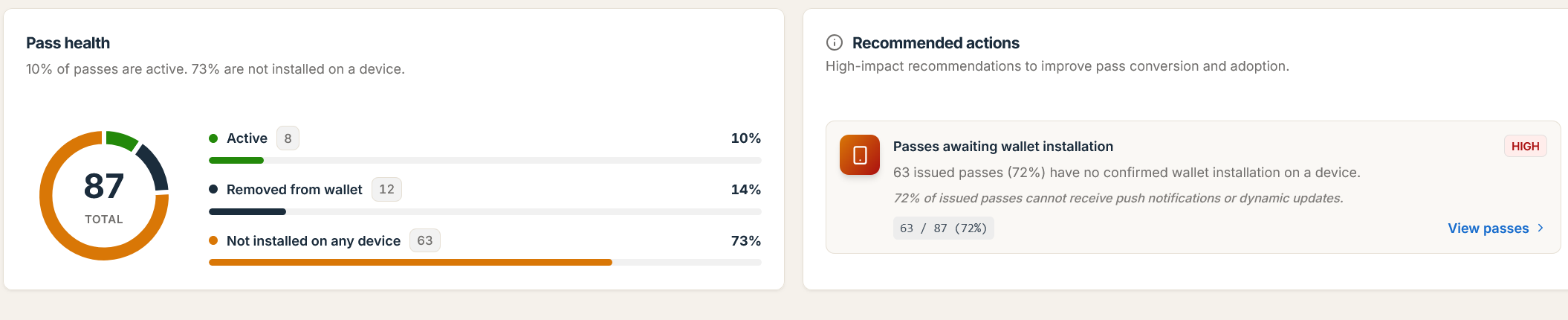
To monitor your pass program accurately, Passinstance distinguishes between server-side record creation and physical wallet installation:
Pass Created (POST /api/v1/passes)  ================>  unclaimedPasses (Not Installed)
                                                               |
                                                               | Customer Adds to Wallet
                                                               v
Device Registered (POST /v1/devices/...) ===========>  installedDevices (Installed)
                                                               |
                                                               | Customer Deletes from Wallet
                                                               v
Device Unregisters (DELETE /v1/devices/...) ========>  inactivePasses / inactiveDeviceRegistrations
Definitions from metric-definitions.ts
-
totalPasses(Total Passes Issued): Cumulative count of live pass records generated in your workspace that have not been deleted at snapshot time. -
activePasses(Active Passes): Live pass instances that currently have at least one reachable device registration (excluding expired and voided passes). -
installedDevices(Active Device Registrations): Reachable saved pass registrations across Apple APNs and Google Wallet. If one pass is saved on two devices, it counts as two active registrations and meters plan capacity. -
unclaimedPasses(Unclaimed Passes): Live pass instances issued in Passinstance that have never been saved to a wallet. -
inactivePasses(Removed Passes): Live pass instances that were previously saved to a wallet, but no longer have any reachable device registrations (including AppleDELETE /v1/devices/...and Googledelcallbacks to/api/v1/wallet/callback). -
voidedPasses(Voided Passes) &expiredPasses(Expired Passes): Pass instances revoked server-side or pastexpirationDate.
Workspace Settings & Regional Configuration
Each workspace is configured independently under Settings -> Workspace (/settings/workspace/*):
-
General & Regional Settings (
PUT /api/v1/customer/:customerId/regional-settings): Configures default timezone (resolveCustomerTimeZone), default ISO 4217 currency code, and language locale. -
Usage Quotas (
GET /api/v1/customer/:customerId/usage-summary): Reports real-time total passes, active passes againstmaxActivePasses, and template counts. -
Whitelabel Vanity Domains (
/api/v1/white-labeling/vanity-urls): Connects custom domains (domain surface type:PASS_DOWNLOAD,PASS_FLOW,BACKEND_UI, etc.) with automated SSL provisioning for all smart links and download pages.
Important: Sandbox workspaces provide an isolated environment to test template revisions, API webhooks, and scanner configurations without consuming active pass capacity from your production plan.